ESP8266 Write Multiple Fields Thingspeak.com
#include <ESP8266WiFi.h>
#include "secrets.h"
#include "ThingSpeak.h" // include thingspeak header
#include <math.h>

char ssid[] = SECRET_SSID;   // your network SSID (name)
char pass[] = SECRET_PASS;   // your network password
int keyIndex = 0;            // your network key Index number (needed only for WEP)
WiFiClient  client;

unsigned long myChannelNumber = SECRET_CH_ID;
const char * myWriteAPIKey = SECRET_WRITE_APIKEY;

// Schematic:
// [+3V] ---- [Thermistor 10k-Resistor] -------|------- [10k-Resistor] ---- [Ground]
//                                             |
//                                       Analog Pin A0

int analogpin = A0;
int sensorvalue;
float Vin;
float Temp_C;  // Celsius
float Temp_K;  // Kelvin
float Temp_F;  // Fahrenheit

//*****************************************************************************************************
float Thermistor(int RawADC){ //Function to perform math of the Steinhart-Hart equation

      Temp_C = log(((10230000/RawADC)-10000));       // Temp = log(10000.0*((1023.0/RawADC-1)));
      Temp_C = 1/(0.001129148+(0.000234125+(0.0000000876741*Temp_C*Temp_C))*Temp_C);
      Temp_C = Temp_C - 273.15;                       // Convert Kelvin to Celsius
      return Temp_C;
}

//*****************************************************************************************************
// Initialize values
int number1 = 0;
int number2 = 0;
int number3 = 0;
int number4 = 0;
String myStatus = "";

//*****************************************************************************************************
void setup() {
  Serial.begin(115200);  // Initialize serial
  while (!Serial) {
    ; // wait for serial port to connect. Needed for Leonardo native USB port only
  }
  WiFi.mode(WIFI_STA);
  ThingSpeak.begin(client);  // Initialize ThingSpeak
}

//*****************************************************************************************************
void loop() {
  // Connect or reconnect to WiFi
  if(WiFi.status() != WL_CONNECTED){
    Serial.print("Attempting to connect to SSID: ");
    Serial.println(SECRET_SSID);
    while(WiFi.status() != WL_CONNECTED){
      WiFi.begin(ssid, pass);  // Connect to WPA/WPA2 network. Change this line if using open or WEP network
      Serial.print(".");
      delay(5000);
    }
    Serial.println("\nConnected.");
  }

//****************************************************************************************************
    Vin = sensorvalue*(3.0/1023.0);

    sensorvalue = analogRead(analogpin);
    Temp_C = Thermistor(sensorvalue);       // Temp_C = Thermistor(analogRead(analogpin));

    Temp_K = Temp_C + 273.15;             // Convert Kelvin  to Celcius
    Temp_F = (Temp_C*1.8) + 32.0;          // Convert Celsius  to Fahrenheit


    Serial.print("ADC Sensor Value\t");
    Serial.print(sensorvalue);
    Serial.print("\t");

    Serial.print("Voltage input\t");
    Serial.print(Vin);
    Serial.print("\t");

    Serial.print("Temperature Celsius\t");
    Serial.print(Temp_C);
    Serial.print("\t");

    Serial.print("Temperature Kelvin\t");
    Serial.print(Temp_K);
    Serial.print("\t");

    Serial.print("Temperature Fahrenheit\t");
    Serial.print(Temp_F);
    Serial.println("\t");


  number1 = sensorvalue;
  number2 = Vin;
  number3 = Temp_C;
  number4 = Temp_K;

//****************************************************************************************************
// set the fields with the values
  ThingSpeak.setField(1, number1);
  ThingSpeak.setField(2, number2);
  ThingSpeak.setField(3, number3);
  ThingSpeak.setField(4, number4);

 //****************************************************************************************************
  // figure out the status message
  if(number1 > number2){
    myStatus = String("field1 is greater than field2");
  }
  else if(number1 < number2){
    myStatus = String("field1 is less than field2");
  }
  else{
    myStatus = String("field1 equals field2");
  }
 //****************************************************************************************************
  // set the status
  ThingSpeak.setStatus(myStatus);
 //****************************************************************************************************
 // write to the ThingSpeak channel
  int x = ThingSpeak.writeFields(myChannelNumber, myWriteAPIKey);
  if(x == 200){
    Serial.println("Channel update successful.");
  }
  else{
    Serial.println("Problem updating channel. HTTP error code " + String(x));
  }

 //****************************************************************************************************
  delay(5000); // Wait 5 seconds to update the channel again
 //****************************************************************************************************
}
Channel update successful.
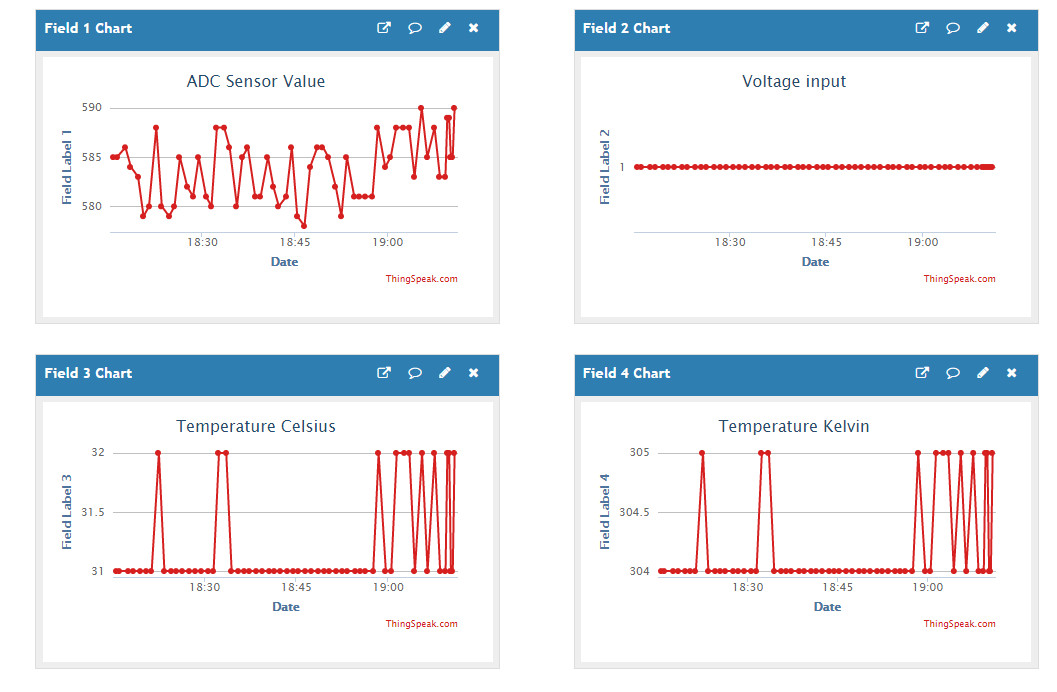
ADC Sensor Value 585 Voltage input 1.72 Temperature Celsius 31.73 Temperature Kelvin 304.88 Temperature Fahrenheit 89.11
Problem updating channel. HTTP error code -401
https://thingspeak.com/channels/1452499