
คำอธิบาย
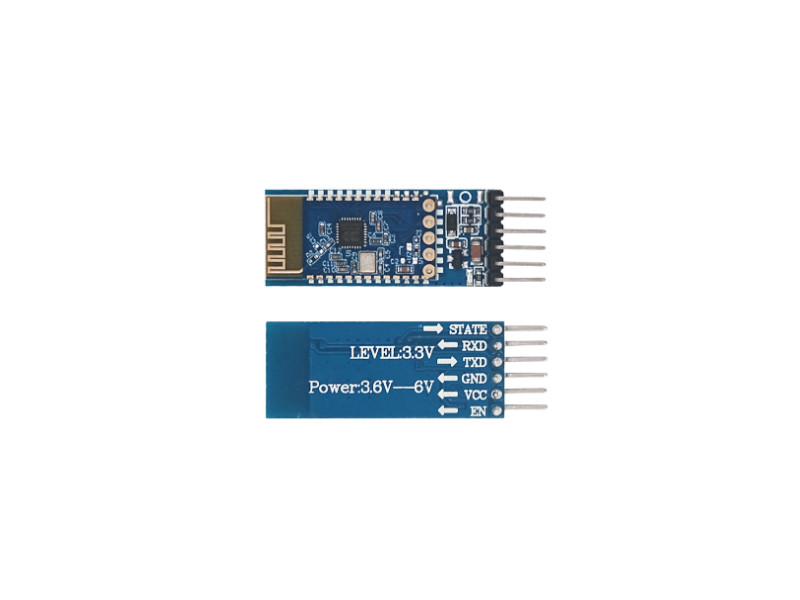
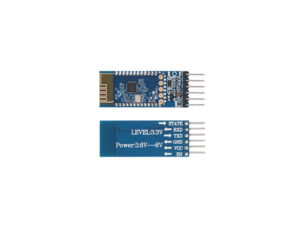
โมดูลบลูทูธ Bluetooth Module HC-06 (ZS-040) BT-06 TTL data technology
- Default PIN 1234
- บลูทูธ Bluetooth V3.0 + EDR
- Default Baud Rate 9600,8,1,n (Supports 1200bps ~ 1382400bps)
- Built in antenna
- Effective range 10 meters in open field (Class 2 power)
- Operating voltage DC3.6 ~ 6V
- Size 1.5 x 4.3cm
เป็นอุปกรณ์บลูทูธที่ใช้กันอย่างแพร่หลายซึ่งใช้กันทั่วไปในโครงการสื่อสารไร้สาย เป็นโมดูลขนาดเล็กราคาประหยัดที่เข้ากันได้กับไมโครคอนโทรลเลอร์และระบบปฏิบัติการที่หลากหลาย สามารถใช้เป็นอุปกรณ์หลักหรืออุปกรณ์รอง และสามารถทำงานได้ในโหมดต่างๆ รวมถึงพอร์ตอนุกรม และคำสั่ง AT command โมดูลมีช่วงสูงถึง 30 เมตร (100 ฟุต) และทำงานที่ความถี่ 2.4 GHz
ตัวอย่างวิธีใช้ โมดูลบลูทูธ กับ Arduino เพื่อส่งและรับข้อมูล:
แอปมือถือ: ฟรี! ใช้แอปจาก Play Store เช่น:
- Bluetooth Terminal
- Arduino Bluetooth Controller
- หรือสร้างเองด้วย MIT App Inventor
เชื่อมต่อโมดูลบลูทูธ เข้ากับ Arduino
- EN
- โมดูลบลูทูธ VCC >> 3.3V Arduino
- GND >> GND Arduino
- RXD >> 11 Arduino
- TXD >> 10 Arduino
- State
ประกาศพิน RX และ TX ของ โมดูลบลูทูธ เป็นออบเจ็กต์ SoftwareSerial
#include <SoftwareSerial.h>

SoftwareSerial BTSerial(10, 11); // RX | TX
ในฟังก์ชั่น setup() ให้ตั้งค่า baud rate สำหรับทั้ง โมดูลบลูทูธ และ Arduino:
void setup() {

BTSerial.begin(9600);

Serial.begin(9600); }
ในฟังก์ชัน loop() สามารถใช้ BTSerial object เพื่อส่งและรับข้อมูลผ่าน โมดูลบลูทูธ
ส่งข้อมูล:
BTSerial.write("Hello, world!");
รับข้อมูล:
if (BTSerial.available()) {
char c = BTSerial.read();
Serial.write(c); }
#include <SoftwareSerial.h>

// Create a software serial object
SoftwareSerial BTserial(10, 11); // RX, TX

void setup() {
  // Initialize serial communication with the computer
  Serial.begin(9600);
  // Initialize serial communication with the HC-05
  BTserial.begin(9600);
}

void loop() {
  // Check if there is data available on the serial port
  if (BTserial.available()) {
    // Read the data and print it to the serial monitor
    char c = BTserial.read();
    Serial.print(c);
  }

  // Check if there is data available on the serial monitor
  if (Serial.available()) {

    // Read the data and send it to the Bluetooth module
    char c = Serial.read();
    BTserial.print(c);
  }
}
รีวิว
ยังไม่มีบทวิจารณ์