

คำอธิบาย
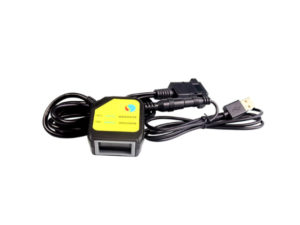
โมดูลสแกนอ่านบาร์โค้ด Barcode Scanner 1D 2D QR Code Module MH TTL+USB
- รองรับ Arduino IDE
- Read barcode type (1D): UPC/EAN, UPC/EAN with supplements , Book land EAN, ISSN, UCC Coupon Extended Code, Code 128, GS1-128, ISBT 128, Code 39, Code 39 Full
ASCII, Tri optic Code 39, Code 32, Code 93, Code 11, Matrix 2 of 5, Interleaved 2 of 5, Discrete 2 of 5, Cod abar, MSI, Chinese 2 of 5, GS1 Data Bar variants, Korean 3 of 5, ISBT Concat - QR code type (2D): QR Code, PDF417, Data Matrix
โหมด สั่งการทำงาน
- Communication mode
- USB Interface, Keyboard Mode
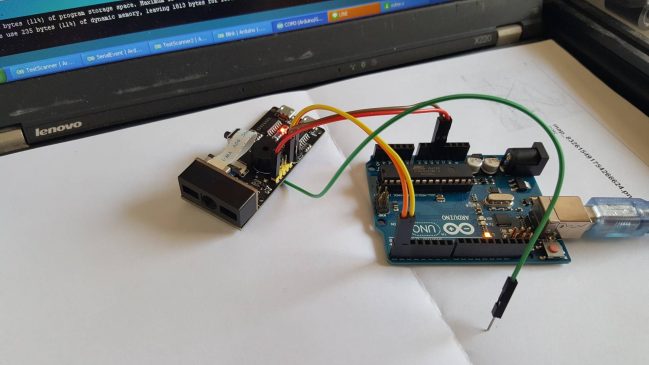
Wiring Diagram
https://oshwlab.com/s2insupply/barcode-mh-usb-ttl-arduino
Arduino Code for QR Code Reader
String inputString = "";      // ตัวแปรสำหรับเก็บค่าจากตัวแสกนเนอร์
String DataScanner = "";      //ตัวแปรสำหรับเก็บค่าในการประมวลผล
bool stringComplete = false;  // ตัวแปรเช็คว่ารับข้อมูลครบแล้วหรือยัง

void setup() {
    pinMode(8, OUTPUT); //พอร์ตสำหรับกระตุ้นให้ตัวแสกนเนอร์ทำงาน
  // initialize serial:
  Serial.begin(9600);
   while (!Serial) {
    ; // wait for serial port to connect. Needed for native USB port only
  }
  // ประกาศตัวแปรสำหรับเก็บข้อความขนาด 200 ตัวอักษร
  inputString.reserve(200);
}

void loop() {
  digitalWrite(8, HIGH);   // ส่งค่าลอจิก High
  delay(200);              // หน่วงเวลา 200 msec
  digitalWrite(8, LOW);    // ส่งค่าลอจิก Low เปรียบเสมือนการกดสวิตช์ เพื่อให้ตัวแสกนเนอร์ทำงาน
  delay(200);              // หน่วงเวลา 200 msec

  // เริ่มเช็คว่ามีข้อมูลจากตัวแสกนเนอร์เข้ามาครบหรือยัง
  if (stringComplete) {

       if (DataScanner == "8859411300023\r\n") // ข้อมูลตรงกับที่ตั้งไว้ ให้แสดงข้อความ OK
       {
          Serial.println("OK");
          delay(1000);
       }
       else Serial.println("No Data"); // ข้อมูลไม่ตรงกับที่ตั้งไว้ ให้แสดงข้อความ No Data

    // เคลียร์ค่า เพื่อรอข้อมูลใหม่
    inputString = "";
    DataScanner = "";
    stringComplete = false;
  }
}

/*
  SerialEvent occurs whenever a new data comes in the hardware serial RX. This
  routine is run between each time loop() runs, so using delay inside loop can
  delay response. Multiple bytes of data may be available.
*/

void serialEvent() {
  while (Serial.available()) {
    // get the new byte:
    char inChar = (char)Serial.read();
    // add it to the inputString:
    inputString += inChar;
    // if the incoming character is a newline, set a flag so the main loop can
    // do something about it:
    if (inChar == '\n') {
      stringComplete = true;
      DataScanner = String(inputString);
    }
  }
}
Arduino Code Basic Software serial
int inByte = 0;         // incoming serial byte
void setup() {
  // start serial port at 9600 bps:
  Serial.begin(9600);
}

void loop() {
  if (Serial.available() > 0)
  {
    // get incoming byte:
    inByte = Serial.read();
    Serial.write(inByte);
  }
}
/*
  Software serial multiple serial test

 Receives from the hardware serial, sends to software serial.
 Receives from software serial, sends to hardware serial.

 The circuit:
 * RX is digital pin 10 (connect to TX of other device)
 * TX is digital pin 11 (connect to RX of other device)

 Note:
 Not all pins on the Mega and Mega 2560 support change interrupts,
 so only the following can be used for RX:
 10, 11, 12, 13, 50, 51, 52, 53, 62, 63, 64, 65, 66, 67, 68, 69

 Not all pins on the Leonardo and Micro support change interrupts,
 so only the following can be used for RX:
 8, 9, 10, 11, 14 (MISO), 15 (SCK), 16 (MOSI).

 created back in the mists of time
 modified 25 May 2012
 by Tom Igoe
 based on Mikal Hart's example

 This example code is in the public domain.

 */
#include <SoftwareSerial.h>

SoftwareSerial mySerial(10, 11); // RX, TX

void setup() {
  // Open serial communications and wait for port to open:
  Serial.begin(9600);
  while (!Serial) {
    ; // wait for serial port to connect. Needed for native USB port only
  }
  // set the data rate for the SoftwareSerial port
  mySerial.begin(9600);
  mySerial.println("Hello, world?");
}

void loop() { // run over and over
  if (mySerial.available()) {
    Serial.write(mySerial.read());
  }
  if (Serial.available()) {
    mySerial.write(Serial.read());
  }
}
รีวิว
ยังไม่มีบทวิจารณ์